
Infinite Campus Portal Update for Families and Students
The Infinite Campus update is now complete. To ensure continued access to student information, families and students will need to use the new Infinite Campus cloud link for the 2026 - 2027 school year.
What You Need to Do
Update your bookmark to the new Infinite Campus cloud - Link
Delete old bookmarks, as they will no longer work
Log in as usual - your username and password remain the same
Instructions - For step by step login instructions or help for new users - Click Here
Parent Portal Login
The Parent Portal login process is not changing. Parents will continue signing in as usual using their existing credentials.
We encourage parents to support their student with the new Single Sign-On (SSO) login process below to help ensure a smooth transition.
Student Login Update (SSO)
An improved, more user-friendly Infinite Campus sign-in experience is being introduced for students once schools complete student scheduling for the 2026 - 2027 school year. Students will select the appropriate account option from a dropdown menu before signing in with their existing credentials. This enhancement helps direct users to the correct account automatically, reducing confusion and improving reliability.
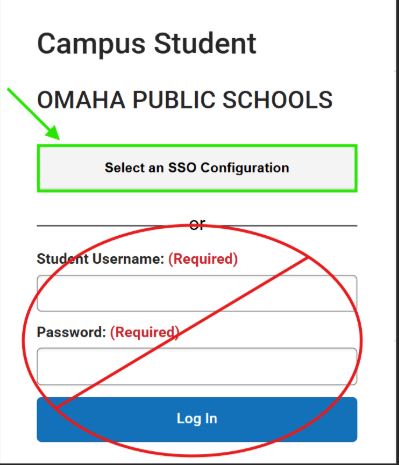
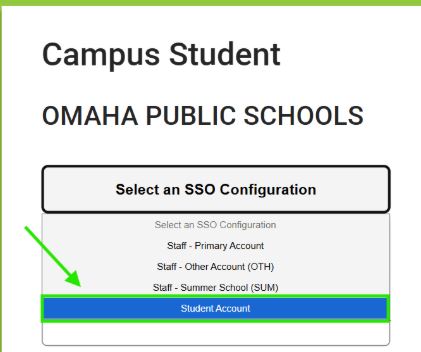
Below are step-by-step directions along with a screenshot of the new dropdown menu to help guide you through the updated login process.
Click on the "Select an SSO Configuration" to view the SSO options.
Select the appropriate account from the dropdown menu.
Why This Matters
Updating your bookmarks and using the correct login method ensures quick access to grades, attendance, schedules, and important school information. Staying connected helps families support student success and allows staff to manage student information more efficiently.
Need Help?
If you experience issues after updating your bookmark or logging in, please contact your school for assistance.